Short answer
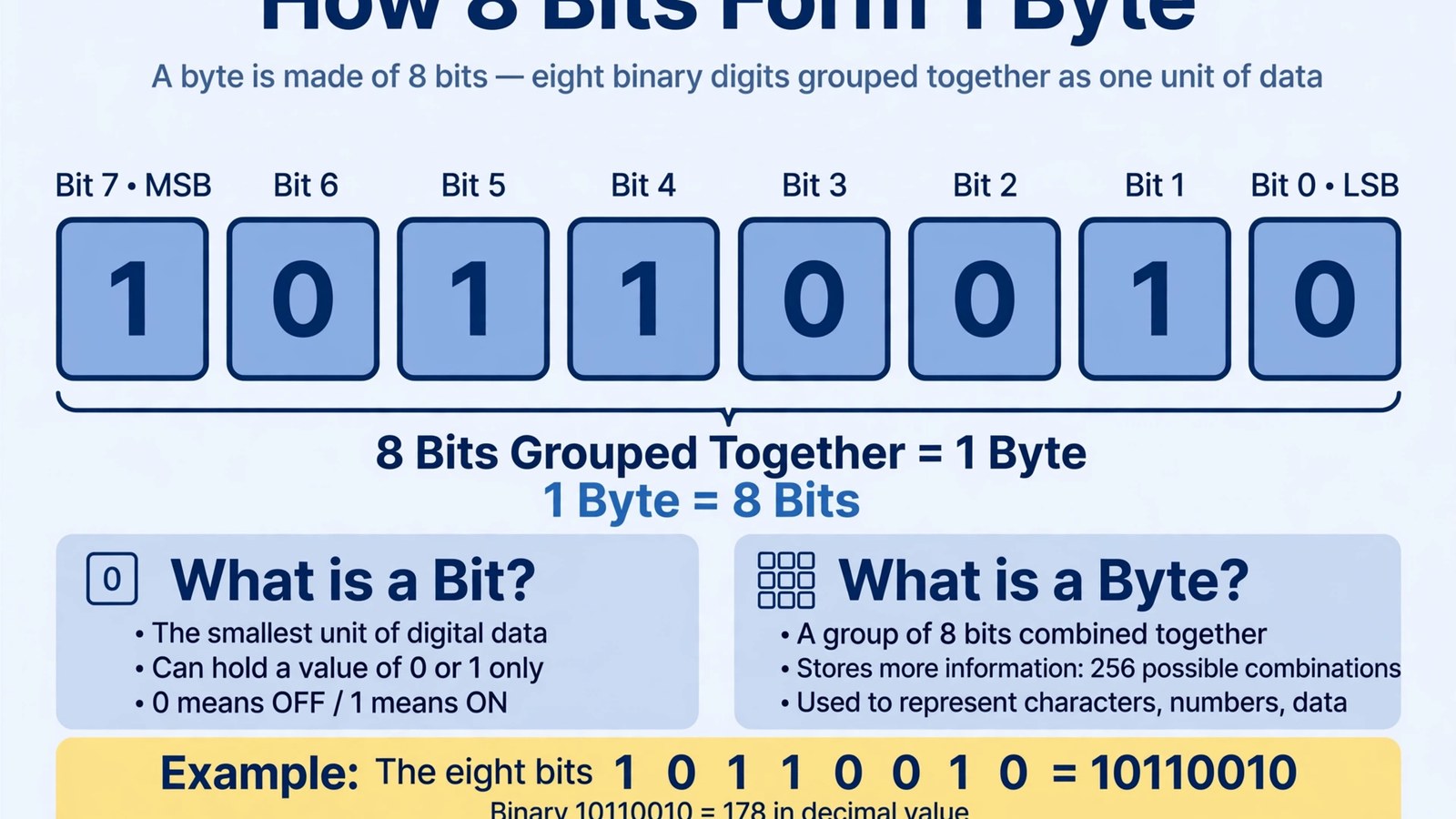
- There are 8 bits in 1 byte. That is the standard modern definition, and it is the definition behind the file sizes, memory sizes, and storage labels you meet in everyday computing. The National Institute of Standards and Technology (NIST) lists the relationship in exactly this form: one byte, written as 1 B, equals 8 bits. A bit is a single binary digit, a 0 or a 1. A byte is a group of eight bits handled as one unit. Because each of the eight positions can hold two values, a byte can hold 2 multiplied by itself eight times, which is 256 different combinations, written in decimal as the values 0 to 255. To convert in either direction, use the factor of eight and nothing else. To change bits into bytes, divide by 8. To change bytes into bits, multiply by 8. So 64 bits is 64 divided by 8, which is 8 bytes, and 12 bytes is 12 multiplied by 8, which is 96 bits. Two cautions complete the short answer. First, larger units come in two exact systems, decimal and binary, and they must not be mixed. In the decimal system a kilobyte (kB) is 1,000 bytes and a megabyte (MB) is 1,000,000 bytes. In the binary system a kibibyte (KiB) is 1,024 bytes and a mebibyte (MiB) is 1,048,576 bytes. Second, internet speeds are normally given in bits per second, such as megabits per second (Mbps), while file sizes are normally given in bytes. A speed of 100 Mbps is therefore 12.5 megabytes per second, not 100 megabytes per second. The rest of this article explains each of those points in full, with complete tables and worked examples.
By Emma Hudson
Introduction
If a download seems slower than the speed on your broadband bill suggests, or a new drive seems to hold less than the number on its box, the cause is often a simple mix-up between bits and bytes. The two words look almost the same, they are both used for amounts of digital information, and they differ by a factor of eight. This guide starts with the direct answer, then explains what a bit is, what a byte is, why the standard byte has eight bits, how larger units such as kilobytes and kibibytes are defined, and how to convert between bits and bytes without error. Every figure in the tables is worked out from the definitions given here, so you can check any entry yourself with one multiplication or one division.
What Is a Bit?
A bit, short for binary digit, is the smallest unit of digital information. It has only two possible values, 0 and 1. Those two values can be described in other pairs, such as off or on, false or true, and low or high, but the meaning is the same: one choice between two states.
A single bit can answer one yes or no question and nothing more. It cannot stand for a letter, hold a number larger than 1, or describe a color on its own. That limit is why bits are grouped: almost everything a computer stores or sends, from a text message to a long video, is a pattern made from very large numbers of bits arranged in order.
Bits are the unit most often used for data moving over a connection. Network speeds, broadband plans, and mobile data rates are conventionally quoted in bits per second, because data transmission was historically described one bit at a time as it moved along a line. When you see a lowercase b in a unit such as Mb or Mbps, it normally signals bits. When you see a capital B in a unit such as MB, it signals bytes. That one letter carries the whole factor of eight, so it is worth checking before you compare any two figures.
What Is a Byte?
A byte is a group of eight bits treated as a single unit. Treating the group as one unit matters because computers read, store, and move information in bytes far more often than they handle a lone bit. A file size in bytes is a count of these eight-bit groups.
An example makes the structure concrete. Take the byte 10110010. Read from left to right, its eight bits are 1, 0, 1, 1, 0, 0, 1, and 0. Read as a binary number, its value is 128 plus 0 plus 32 plus 16 plus 0 plus 0 plus 2 plus 0, which is 178. Change any one bit and the value changes. Change the first bit from 1 to 0 and the value falls by 128, to 50. Change the last bit from 0 to 1 and the value rises by 1, to 179. Each position has a fixed weight, and the byte is the sum of the weights where the bit is 1.
A byte can hold more than a number. The same eight-bit pattern can be interpreted in different ways by different programs: part of a character of text, part of a color value in an image, part of a sound sample, or part of a larger number spread across several bytes. Holding a character was an important early use, but it is a use of a byte, not its definition. The definition is only the group of eight bits.
Why Does a Byte Have Eight Bits?
The eight-bit byte was not the only size ever used. Early computers used different groupings, including six-bit and seven-bit groupings, because different machines, character sets, and hardware designs made different choices sensible at the time. There was no single law of nature that required eight.
The eight-bit size became standard for practical reasons. It was large enough to hold the character sets in common use, including uppercase letters, lowercase letters, digits, and symbols, with room to spare. It also fitted hardware built around powers of two, because 8 is 2 to the power of 3 and 256 is 2 to the power of 8, so addressing and arithmetic stayed tidy. As personal computing spread, the convention spread with it and hardened into the modern standard.
Standards language reflects that history. In networking and in formal standards documents, an eight-bit byte is often called an octet, a word that can only mean eight bits and so removes any doubt left by older machines with other sizes. In everyday modern use: 1 octet equals 1 byte equals 8 bits, and that rule is unqualified for every conversion in the tables below.
The Nibble: Half a Byte
Half a byte, which is four bits, is sometimes called a nibble. A nibble can hold 2 to the power of 4, which is 16 different values, written in decimal as 0 to 15. That is exactly the range of one hexadecimal digit, which is why nibbles appear in technical work where binary patterns are written in hexadecimal for compactness. One byte is two nibbles, and a byte written as two hexadecimal digits is really its two nibbles written one after the other.
The nibble matters less in everyday life than the byte because everyday quantities are not quoted in nibbles. Files are measured in bytes and larger units, and speeds are measured in bits per second, so you do not need the nibble to convert a file size or judge a download time. It is still worth knowing: it shows that the byte is built from a smaller grouping, so eight was a practical choice rather than the only possible grouping, and if you meet the word in technical documentation you will know it means four bits and 16 possible values.
Bits Versus Bytes: The Factor of Eight
Most everyday confusion about data sizes comes from one place: a figure in bits is compared directly with a figure in bytes, as if the two units were the same. They are not. A byte is eight times as large as a bit, so the same amount of data produces a number eight times larger when it is counted in bits than when it is counted in bytes.
Consider a file of 40 MB, meaning 40 megabytes. In bits, that file is 40 multiplied by 8, which is 320 megabits, written as 320 Mb. Neither figure is wrong; they are two counts of the same data in two different units. The error only appears when the unit is ignored and 40 is compared with a speed as if both numbers shared a unit.
The practical check takes a few seconds. Before comparing any two data figures, look at the unit letter. A lowercase b means bits and a capital B means bytes. If the two figures use different letters, convert one of them by multiplying or dividing by 8 before you compare them. If both use the same letter, no factor of eight is needed, although you may still need to check whether the larger prefixes are decimal or binary, which the next sections cover.
How to Convert Between Bits and Bytes
The conversion has only two rules, and both use the number 8.
To convert bits to bytes, divide the number of bits by 8. For example, 96 bits divided by 8 is 12 bytes, and 800 bits divided by 8 is 100 bytes. If the division leaves a remainder, the answer can include a fraction of a byte, as with 100 bits, which is 12.5 bytes. A fraction of a byte is a valid amount for a conversion, even though storage is normally organized in whole bytes.
To convert bytes to bits, multiply the number of bytes by 8. For example, 5 bytes multiplied by 8 is 40 bits, and 250 bytes multiplied by 8 is 2,000 bits.
For larger units, convert in two steps and keep them separate. First deal with the prefix, changing kilobytes to bytes or megabits to bits using the tables below. Then, only if you need to cross between bits and bytes, apply the factor of eight. Keeping the steps separate prevents the most common arithmetic slips.
| Bits | Bytes | Working |
|---|---|---|
| 1 bit | 0.125 bytes | 1 divided by 8 |
| 8 bits | 1 byte | 8 divided by 8 |
| 16 bits | 2 bytes | 16 divided by 8 |
| 32 bits | 4 bytes | 32 divided by 8 |
| 64 bits | 8 bytes | 64 divided by 8 |
| 100 bits | 12.5 bytes | 100 divided by 8 |
| 256 bits | 32 bytes | 256 divided by 8 |
| 800 bits | 100 bytes | 800 divided by 8 |
| 1,024 bits | 128 bytes | 1,024 divided by 8 |
| 8,000 bits | 1,000 bytes | 8,000 divided by 8 |
| 8,192 bits | 1,024 bytes | 8,192 divided by 8 |
| 1,000,000 bits | 125,000 bytes | 1,000,000 divided by 8 |
| Bytes | Bits | Working |
|---|---|---|
| 1 byte | 8 bits | 1 multiplied by 8 |
| 10 bytes | 80 bits | 10 multiplied by 8 |
| 100 bytes | 800 bits | 100 multiplied by 8 |
| 250 bytes | 2,000 bits | 250 multiplied by 8 |
| 1,000 bytes | 8,000 bits | 1,000 multiplied by 8 |
| 1,024 bytes | 8,192 bits | 1,024 multiplied by 8 |
| 125,000 bytes | 1,000,000 bits | 125,000 multiplied by 8 |
| 1,000,000 bytes | 8,000,000 bits | 1,000,000 multiplied by 8 |
Decimal Prefixes and Binary Prefixes
Above the byte, amounts grow quickly, so prefixes are used to keep numbers readable. This is where a second, separate source of confusion appears. There are two exact prefix systems, and they give different values to similar-sounding units. Keeping them apart is essential, and the standard names exist so that no one has to guess.
The decimal system uses SI prefixes, and SI prefixes always mean powers of ten. Kilo means 1,000, mega means 1,000,000, giga means 1,000,000,000, and tera means 1,000,000,000,000. NIST states the rule plainly: SI prefixes refer strictly to powers of 10 and should not be used to indicate powers of 2. Applied to bytes, that gives the decimal units in the first table below, and applied to bits it gives a kilobit of 1,000 bits and a megabit of 1,000,000 bits. Network speeds and storage manufacturer labels normally use this decimal system.
The binary system uses IEC prefixes, created to name powers of two without borrowing the SI names. Kibi means 1,024, which is 2 to the power of 10. Mebi means 1,048,576, which is 2 to the power of 20. Gibi means 1,073,741,824, which is 2 to the power of 30, and tebi means 1,099,511,627,776, which is 2 to the power of 40. The IEC approved these names as an international standard in December 1998, and NIST publishes the same factors, including 1 KiB equals 1,024 bytes and 1 MiB equals 1,048,576 bytes.
The difference between the two systems is small at the kilo level and grows at each step. A kibibyte is 2.4 percent larger than a kilobyte, a mebibyte is about 4.9 percent larger than a megabyte, a gibibyte is about 7.4 percent larger than a gigabyte, and a tebibyte is about 10.0 percent larger than a terabyte. Those percentages are not rounding; each follows from comparing 1,024 multiplied repeatedly with 1,000 multiplied the same number of times.
| Decimal unit | Bytes | Bits |
|---|---|---|
| 1 kilobyte (kB) | 1,000 | 8,000 |
| 1 megabyte (MB) | 1,000,000 | 8,000,000 |
| 1 gigabyte (GB) | 1,000,000,000 | 8,000,000,000 |
| 1 terabyte (TB) | 1,000,000,000,000 | 8,000,000,000,000 |
| Binary unit | Bytes | Bits |
|---|---|---|
| 1 kibibyte (KiB) | 1,024 | 8,192 |
| 1 mebibyte (MiB) | 1,048,576 | 8,388,608 |
| 1 gibibyte (GiB) | 1,073,741,824 | 8,589,934,592 |
| 1 tebibyte (TiB) | 1,099,511,627,776 | 8,796,093,022,208 |
The same two systems apply to bits, which matters when you read network and memory specifications closely.
| Bit unit | Bits | Bytes |
|---|---|---|
| 1 kilobit (kbit) | 1,000 | 125 |
| 1 megabit (Mbit) | 1,000,000 | 125,000 |
| 1 gigabit (Gbit) | 1,000,000,000 | 125,000,000 |
| 1 terabit (Tbit) | 1,000,000,000,000 | 125,000,000,000 |
| 1 kibibit (Kibit) | 1,024 | 128 |
| 1 mebibit (Mibit) | 1,048,576 | 131,072 |
| 1 gibibit (Gibit) | 1,073,741,824 | 134,217,728 |
| 1 tebibit (Tibit) | 1,099,511,627,776 | 137,438,953,472 |
Every entry in these three tables was recomputed from two facts only: 1 byte equals 8 bits, and the prefix factor for the row. For example, the bits figure for 1 MiB is 1,048,576 bytes multiplied by 8, which is 8,388,608 bits, and the bytes figure for 1 Gibit is 1,073,741,824 bits divided by 8, which is 134,217,728 bytes.
Why a Drive Can Show a Smaller Number
The two prefix systems explain a familiar puzzle. A drive sold as 500 GB holds 500,000,000,000 bytes, because the manufacturer uses the decimal definition of a gigabyte, 1,000,000,000 bytes. If a computer display divides that same byte count by the binary factor 1,073,741,824, the result is about 465.7 GiB, and the display may label that result GB even though the arithmetic behind it is binary, which makes the drive look smaller than its box suggested.
No storage has been lost. The byte count is identical; only the unit used to express it has changed, and the binary unit is larger, so the count in that unit is smaller. The same effect is larger on a bigger drive: a drive sold as 1 TB holds 1,000,000,000,000 bytes, which divided by 1,073,741,824 is about 931.3 GiB. To compare two drives fairly, compare bytes with bytes, or convert both sides into the same named unit.
Internet Speeds and Download Times
Internet speeds bring the factor of eight and the prefix rules together, which is why they cause so much confusion. Speeds are sold in bits per second. The abbreviation Mbps means megabits per second, and because mega in this decimal context means 1,000,000, a speed of 100 Mbps means 100,000,000 bits arriving each second in ideal conditions. File sizes, by contrast, are shown by most programs in bytes, megabytes, or gigabytes.
To turn a speed in Mbps into megabytes per second, divide by 8. A speed of 100 Mbps divided by 8 is 12.5 MB per second. A speed of 50 Mbps divided by 8 is 6.25 MB per second. A speed of 25 Mbps divided by 8 is 3.125 MB per second. A gigabit speed of 1,000 Mbps divided by 8 is 125 MB per second. That single division is the step most often missed, and missing it makes every expected download time eight times too optimistic.
With the speed in the same unit family as the file, the time estimate is a plain division. A 100 MB file on a 100 Mbps connection works as follows. The file in megabits is 100 multiplied by 8, which is 800 megabits. The ideal time is 800 divided by 100, which is 8 seconds. A 500 MB file on a 50 Mbps connection is 500 multiplied by 8, which is 4,000 megabits, divided by 50, which is 80 seconds in ideal conditions.
Larger downloads follow the same method. A 700 MB video file is 5,600 megabits, so at 100 Mbps the ideal time is 56 seconds. A 50 GB game is 50,000 MB, which is 400,000 megabits, so at 100 Mbps the ideal time is 4,000 seconds, which is 66 minutes and 40 seconds. On a 200 Mbps connection the same game gives an ideal time of 2,000 seconds, which is 33 minutes and 20 seconds, because doubling the speed halves the ideal time when the file size is unchanged.
These times are ideal figures, not promises. Real downloads also lose time to connection overhead, congestion, distance, Wi-Fi conditions, and the speed of the server sending the file. The value of the calculation is that it puts you in the right range and stops the factor of eight from making a normal download look broken.
Storage Sizes in Everyday Terms
The same definitions make storage labels easier to judge. A short plain text file may be only a few kilobytes, which is a few thousand bytes, or a few tens of thousands of bits. A phone photo of 5 MB holds 5,000,000 bytes, which is 40,000,000 bits, or 40 megabits. A song file of 4 MB holds 32 megabits of data, which is why the worked example below gives a short ideal download time even on a modest connection.
Backups show why both units matter. A photo library of 20,000 photos at an average of 5 MB each totals 100,000 MB, which is 100 GB in decimal units, and that byte figure is the one to use when buying a backup drive. In bits the same library is 800,000 megabits, and that figure is the useful one for upload time, because upload speeds are quoted in bits per second. At an ideal 50 Mbps, uploading 800,000 megabits would take 16,000 seconds, which is about 4 hours and 27 minutes, before real-world losses.
Worked Examples
Example 1. How many bits are in 5 bytes? Multiply by 8. Five multiplied by 8 is 40, so 5 bytes is 40 bits.
Example 2. How many bytes are in 96 bits? Divide by 8. Ninety-six divided by 8 is 12, so 96 bits is 12 bytes.
Example 3. A song file is 4 MB. How many megabits is that? Four megabytes is 4,000,000 bytes. Multiplied by 8, that is 32,000,000 bits, which is 32 megabits. On a 16 Mbps connection, the ideal download time is 32 divided by 16, which is 2 seconds.
Example 4. Your connection runs at 50 Mbps. How fast is that in megabytes per second? Divide by 8. Fifty divided by 8 is 6.25, so the speed is 6.25 MB per second. A 500 MB file at that rate takes 500 divided by 6.25, which is 80 seconds in ideal conditions.
Example 5. How many bits are in 1 KiB, and how does that differ from 1 kB? One kibibyte is 1,024 bytes, multiplied by 8, which is 8,192 bits. One kilobyte is 1,000 bytes, multiplied by 8, which is 8,000 bits. The difference is 192 bits, which is 24 bytes, and it comes entirely from the prefix, not from the bits and bytes conversion.
Example 6. How many bytes are in 1 Gibit? Divide the bit count by 8. One gibibit is 1,073,741,824 bits, divided by 8, which is 134,217,728 bytes. That is also 128 MiB, because 134,217,728 divided by 1,048,576 is 128.
Common Mistakes to Avoid
Treating a bit and a byte as the same unit is the root mistake. A byte is eight times larger than a bit, and any comparison that ignores the unit letter can be wrong by that whole factor.
Expecting a 100 Mbps connection to download 100 MB each second is the most common result of that root mistake. The correct ideal figure is 12.5 MB per second, because the speed must be divided by 8 before it can be compared with a file size in megabytes.
Assuming kilo always means 1,024 is a second mistake. In SI decimal use, kilo means 1,000, so a kilobyte is 1,000 bytes and a kilobit is 1,000 bits. The unit that always means 1,024 bytes is the kibibyte, and the unit that always means 1,024 bits is the kibibit. If a program or label does not say which system it uses, compare in bytes before drawing a conclusion.
Reading Mbps as MB per second is a third mistake. Mbps has a lowercase b and means megabits per second, while MB per second is written as MB/s, with a capital B. The case of one letter changes the amount by a factor of eight.
Forgetting that real download times are longer than ideal times is a fourth mistake. The arithmetic here gives the best possible time for a perfect connection at full speed throughout. Congestion, overhead, and a slow server all add time, so treat the ideal figure as a floor, not a guarantee.
Frequently Asked Questions
How many bits are in a byte, exactly?
Eight bits. In the standard modern convention, 1 byte equals 8 bits, and NIST lists that relationship directly as 1 B equals 8 bits. To convert, divide a bit count by 8 to get bytes, and multiply a byte count by 8 to get bits.
How many bytes are in a kilobyte?
In decimal counting, 1 kilobyte (kB) is 1,000 bytes. In binary counting, the matching unit has a different name: 1 kibibyte (KiB) is 1,024 bytes. Check which unit is named before comparing two figures.
How many bits are in a kilobyte?
One kilobyte is 1,000 bytes, and each byte is 8 bits, so 1 kB is 8,000 bits. One kibibyte is 1,024 bytes, so 1 KiB is 8,192 bits. The 192 bit difference comes from the prefix alone.
Is a bit bigger than a byte?
No. A bit is the smaller unit. It takes eight bits to make one byte, so a byte is eight times as large as a bit. A single bit holds one value out of two, 0 or 1, while a byte holds one value out of 256.
How many values can a byte represent?
A byte can represent 256 values, from 0 to 255 in decimal, or from 00000000 to 11111111 in binary. Each of its eight bits doubles the number of combinations, and 2 to the power of 8 is 256.
What is a nibble?
A nibble is four bits, which is half a byte. It can hold 16 values, from 0 to 15, which is exactly the range of one hexadecimal digit. Nibbles appear mainly in technical work and are not used on everyday file size or speed labels.
What is an octet?
An octet is another name for an eight-bit byte, used in networking and standards documents to make the size explicit: 1 octet equals 8 bits, always.
Why are internet speeds measured in bits but file sizes in bytes?
It is a long-standing convention from how the two fields developed. Networks described data bit by bit, so speeds settled in bits per second, while storage and files were organized in bytes, so sizes settled in bytes. That is why converting by the factor of eight matters so often.
How do I convert Mbps to megabytes per second?
Divide the Mbps figure by 8. A speed of 100 Mbps is 12.5 MB per second, 50 Mbps is 6.25 MB per second, and 1,000 Mbps is 125 MB per second. Those are ideal rates before overhead and congestion are taken into account.
Why does my 1 TB drive show about 931 GB?
Because the two numbers use different units. The drive holds 1,000,000,000,000 bytes under the decimal definition of a terabyte. Dividing that byte count by 1,073,741,824, the number of bytes in a gibibyte, gives about 931.3 GiB. The display is expressing the same bytes in a larger binary unit, so the count looks smaller. No storage is missing.
How many bits are in a megabyte and a mebibyte?
One megabyte is 1,000,000 bytes, so it holds 8,000,000 bits. One mebibyte is 1,048,576 bytes, so it holds 8,388,608 bits. Keep the names separate and the two figures will never be confused.
Keep reading: How Many GB in a TB
Keep reading: How Many Seconds in an Hour? The Simple Answer, Worked Out
Sources & references
- National Institute of Standards and Technology (NIST), Definitions of the SI units: The binary prefixes. Used for 1 byte equals 8 bits, the binary prefix factors kibi 2 to the power of 10, mebi 2 to the power of 20, gibi 2 to the power of 30, tebi 2 to the power of 40, pebi 2 to the power of 50, and exbi 2 to the power of 60, and for the examples 1 Kibit equals 1,024 bits, 1 kbit equals 1,000 bits, 1 MiB equals 1,048,576 bytes, 1 MB equals 1,000,000 bytes, 1 GiB equals 1,073,741,824 bytes, and 1 GB equals 1,000,000,000 bytes, and for the note that the IEC approved the binary prefixes as an international standard in December 1998 and first adopted them in IEC 60027-2. https://physics.nist.gov/cuu/Units/binary.html
- National Institute of Standards and Technology (NIST), Metric (SI) Prefixes. Used for the SI prefix factors kilo 10 to the power of 3, mega 10 to the power of 6, giga 10 to the power of 9, and tera 10 to the power of 12. https://physics.nist.gov/cuu/Units/prefixes.html


